# Pesquisa - Manual dos Docentes, TAEs e Discentes

**Instituto Federal do Pará – IFPA**

**Diretoria de Tecnologia da Informação – DTI**

**Coordenação de Sistemas de Informação – CSI**

**<span style="font-size: 28.0pt; mso-bidi-font-size: 11.0pt; line-height: 107%; font-family: 'Calibri',sans-serif; mso-fareast-font-family: Calibri;">Roteiro do Módulo de Pesquisa</span>**

<span style="font-size: 18.0pt; mso-bidi-font-size: 11.0pt; line-height: 107%; font-family: 'Calibri',sans-serif; mso-fareast-font-family: Calibri;">Servidores e Discentes</span>

02 de junho de 2021

**<span style="font-size: 16.0pt; mso-bidi-font-size: 11.0pt; line-height: 107%; font-family: 'Calibri',sans-serif; mso-fareast-font-family: Calibri;">Índice</span>**

[<span style="color: black; text-decoration: none; text-underline: none;">1. Fase dos Grupos de Pesquisa....................................................................<span style="mso-tab-count: 1 dotted;">........................................................................................................... </span></span><span style="color: black; text-decoration: none; text-underline: none;">3</span>](#_Toc5088)

[<span style="color: black; text-decoration: none; text-underline: none;"> 1.1. Solicitar Criação do Grupo de Pesquisa<span style="mso-tab-count: 1 dotted;">...................................................................................................................................................</span></span><span style="color: black; text-decoration: none; text-underline: none;">3</span>](#_Toc5089)

[<span style="color: black; text-decoration: none; text-underline: none;"> 1.2. Corrigir/Atualizar os Dados do Grupo de Pesquisa<span style="mso-tab-count: 1 dotted;">............................................................................................................................</span></span><span style="color: black; text-decoration: none; text-underline: none;">3</span>](#_Toc5090)

[<span style="color: black; text-decoration: none; text-underline: none;">2. Fase de Submissão de Propostas<span style="mso-tab-count: 1 dotted;">.........................................................................................................................................................................</span></span><span style="color: black; text-decoration: none; text-underline: none;">3</span>](#_Toc5091)

[<span style="color: black; text-decoration: none; text-underline: none;"> 2.1. Submeter Proposta de Projeto Interno<span style="mso-tab-count: 1 dotted;">...................................................................................................................................................</span></span><span style="color: black; text-decoration: none; text-underline: none;">4</span>](#_Toc5092)

[<span style="color: black; text-decoration: none; text-underline: none;"> 2.2. Solicitar Cota de Bolsa<span style="mso-tab-count: 1 dotted;">....................................................................................................................................................................................</span></span><span style="color: black; text-decoration: none; text-underline: none;">4</span>](#_Toc5093)

[<span style="color: black; text-decoration: none; text-underline: none;"> 2.3. Cadastrar Plano de Voluntário<span style="mso-tab-count: 1 dotted;">....................................................................................................................................................................</span></span><span style="color: black; text-decoration: none; text-underline: none;">4</span>](#_Toc5094)

[<span style="color: black; text-decoration: none; text-underline: none;"> 2.4. Cadastrar Plano de Trabalho Sem Cota<span style="mso-tab-count: 1 dotted;">...................................................................................................................................................</span></span><span style="color: black; text-decoration: none; text-underline: none;">4</span>](#_Toc5095)

[<span style="color: black; text-decoration: none; text-underline: none;"> 2.5. Submeter Proposta de Projeto Externo<span style="mso-tab-count: 1 dotted;">...................................................................................................................................................</span></span><span style="color: black; text-decoration: none; text-underline: none;">5</span>](#_Toc5096)

[<span style="color: black; text-decoration: none; text-underline: none;">3. Etapa de Execução do Projetos<span style="mso-tab-count: 1 dotted;">............................................................................................................................................................................</span></span><span style="color: black; text-decoration: none; text-underline: none;">5</span>](#_Toc5097)

[<span style="color: black; text-decoration: none; text-underline: none;"> 3.1. Registrar Início da Execução do Projeto<span style="mso-tab-count: 1 dotted;">...................................................................................................................................................</span></span><span style="color: black; text-decoration: none; text-underline: none;">5</span>](#_Toc5098)

[<span style="color: black; text-decoration: none; text-underline: none;"> 3.2. Criar a Comunidade Virtual do Projeto<span style="mso-tab-count: 1 dotted;">.....................................................................................................................................................</span></span><span style="color: black; text-decoration: none; text-underline: none;">5</span>](#_Toc5099)

[<span style="color: black; text-decoration: none; text-underline: none;"> 3.3. Discente Registra Interesse em um Plano de Trabalho (com Cota de Bolsa)<span style="mso-tab-count: 1 dotted;">.............................................................................</span></span><span style="color: black; text-decoration: none; text-underline: none;">6</span>](#_Toc5100)

[<span style="color: black; text-decoration: none; text-underline: none;"> 3.4. Coordenador do Projeto Indica/Substitui Bolsista<span style="mso-tab-count: 1 dotted;">...............................................................................................................................</span></span><span style="color: black; text-decoration: none; text-underline: none;">6</span>](#_Toc5101)

[<span style="color: black; text-decoration: none; text-underline: none;"> 3.5. Discente Envia o Relatório Parcial<span style="mso-tab-count: 1 dotted;">...............................................................................................................................................................</span></span><span style="color: black; text-decoration: none; text-underline: none;">6</span>](#_Toc5102)

[<span style="color: black; text-decoration: none; text-underline: none;"> 3.6. Coordenador Emite Parecer sobre o Relatório Parcial<span style="mso-tab-count: 1 dotted;">........................................................................................................................</span></span><span style="color: black; text-decoration: none; text-underline: none;">6</span>](#_Toc5103)

[<span style="color: black; text-decoration: none; text-underline: none;"> 3.7. Discente Envia o Relatório Final<span style="mso-tab-count: 1 dotted;">....................................................................................................................................................................</span></span><span style="color: black; text-decoration: none; text-underline: none;">6</span>](#_Toc5104)

[<span style="color: black; text-decoration: none; text-underline: none;"> 3.8. Coordenador Emite Parecer sobre o Relatório Final do Discente<span style="mso-tab-count: 1 dotted;">....................................................................................................</span></span><span style="color: black; text-decoration: none; text-underline: none;">7</span>](#_Toc5105)

[<span style="color: black; text-decoration: none; text-underline: none;"> 3.9. Enviar Relatório Anual do Projeto<span style="mso-tab-count: 1 dotted;">................................................................................................................................................................</span></span><span style="color: black; text-decoration: none; text-underline: none;">7</span>](#_Toc5106)

<span style="font-size: 12.0pt; mso-bidi-font-size: 11.0pt; line-height: 103%; font-family: 'Times New Roman',serif; mso-fareast-font-family: 'Times New Roman'; color: black; mso-ansi-language: PT-BR; mso-fareast-language: PT-BR; mso-bidi-language: AR-SA;">  
</span>

#### **<span style="mso-bidi-font-size: 18.0pt; line-height: 107%; mso-bidi-font-weight: bold;"><span style="mso-list: Ignore;"><span style="color: #206ea7;"> </span>1.<span style="font-style: normal; font-variant: normal; font-kerning: auto; font-optical-sizing: auto; font-feature-settings: normal; font-variation-settings: normal; font-stretch: normal; font-size: 7pt; line-height: normal; font-family: 'Times New Roman';"> </span></span></span>Fase dos Grupos de Pesquisa**

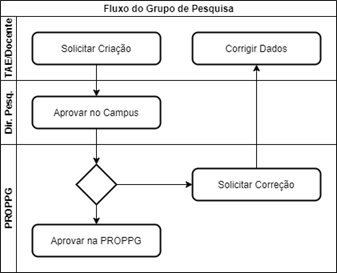
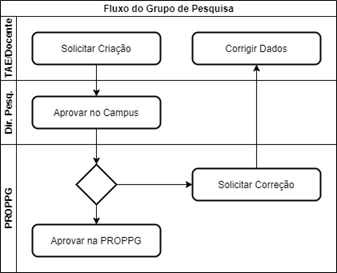
<span style="mso-bidi-font-size: 12.0pt; line-height: 103%; font-family: 'Arial',sans-serif;">Todo projeto deve estar vinculado a um grupo de pesquisa. Sendo assim, primeiramente é necessário que o proponente esteja participando de um grupo de pesquisa, ou que ele solicite a criação de um novo grupo de pesquisa.</span>

[![image.png](https://base.ifpa.edu.br/uploads/images/gallery/2023-06/scaled-1680-/7hQLgIfDO0LP5GTX-image.png)](https://base.ifpa.edu.br/uploads/images/gallery/2023-06/7hQLgIfDO0LP5GTX-image.png)

<span style="mso-no-proof: yes;">  
</span>

#### **<span style="mso-bidi-font-size: 16.0pt; line-height: 107%; mso-bidi-font-weight: bold;"><span style="mso-list: Ignore;"><span style="color: #206ea7;"> </span>1.1.<span style="font-style: normal; font-variant: normal; font-kerning: auto; font-optical-sizing: auto; font-feature-settings: normal; font-variation-settings: normal; font-stretch: normal; font-size: 7pt; line-height: normal; font-family: 'Times New Roman';"> </span></span></span>Solicitar Criação do Grupo de Pesquisa**

<span style="mso-bidi-font-size: 12.0pt; line-height: 103%; font-family: 'Arial',sans-serif;">Preenchimento de um formulário indicando, título, linhas de pesquisa, objetivos, membros, etc.</span>

<span style="mso-bidi-font-size: 12.0pt; line-height: 103%; font-family: 'Calibri',sans-serif; mso-fareast-font-family: Calibri;"><span style="mso-list: Ignore;">•<span style="font: 7.0pt 'Times New Roman';"> </span></span></span>**TAE**: Módulo "Pesquisa", Aba "Operações", Item "Grupo de Pesquisa &gt; Cadastrar"

<span style="mso-bidi-font-size: 12.0pt; line-height: 103%; font-family: 'Calibri',sans-serif; mso-fareast-font-family: Calibri;"><span style="mso-list: Ignore;">•<span style="font: 7.0pt 'Times New Roman';"> </span></span></span>**Docente**: Módulo "Portal do Docente", Menu "Pesquisa", Item "Grupo de Pesquisa/Projetos de Apoio &gt; Proposta de Criação de Grupo de Pesquisa &gt; Cadastrar"

<span style="mso-bidi-font-size: 12.0pt; line-height: 100%; font-family: 'Calibri',sans-serif; mso-fareast-font-family: Calibri;"><span style="mso-list: Ignore;">•<span style="font: 7.0pt 'Times New Roman';"> </span></span></span>**<span style="color: #c9211e;">OBS.1</span>**<span style="color: #c9211e;">: A cada etapa avançada a proposta de criação do grupo é salva, mas a proposta **apenas é submetida para**</span><span style="color: #c9211e;"> </span>

<span style="color: #c9211e;"> **avaliação na última etapa**;</span>

<span style="mso-bidi-font-size: 12.0pt; line-height: 100%; font-family: 'Calibri',sans-serif; mso-fareast-font-family: Calibri;"><span style="mso-list: Ignore;">•<span style="font: 7.0pt 'Times New Roman';"> </span></span></span>**<span style="color: #c9211e;">OBS.2</span>**<span style="color: #c9211e;">: Durante a etapa 3 é necessário enviar e-mails para os membros solicitando a assinatura. Os membros receberão e-</span>

<span style="color: #c9211e;"> mails contendo links e senhas provisórias para efetuarem a assinatura do grupo de pesquisa. **Apenas após todos os** </span>

<span style="color: #c9211e;"> **membros** </span>**assinarem é que será possível enviar a proposta para avaliação**<span style="color: rgb(201, 33, 30); text-indent: -18pt;"> na última etapa.</span>

#### **<span style="mso-bidi-font-size: 16.0pt; line-height: 107%; mso-bidi-font-weight: bold;"><span style="mso-list: Ignore;"><span style="color: #206ea7;"> </span>1.2.<span style="font-style: normal; font-variant: normal; font-kerning: auto; font-optical-sizing: auto; font-feature-settings: normal; font-variation-settings: normal; font-stretch: normal; font-size: 7pt; line-height: normal; font-family: 'Times New Roman';"> </span></span></span>Corrigir/Atualizar os Dados do Grupo de Pesquisa**

Durante a avaliação da proposta, a gestão poderá solicitar correção de dados. Eventualmente a gestão poderá solicitar atualização de dados de grupos de pesquisa já aprovados.

<span style="mso-bidi-font-size: 12.0pt; line-height: 103%; font-family: 'Calibri',sans-serif; mso-fareast-font-family: Calibri;"><span style="mso-list: Ignore;">•<span style="font: 7.0pt 'Times New Roman';"> </span></span></span>**TAE**: Módulo "Pesquisa", Aba "Operações", Item "Grupo de Pesquisa &gt; Consultar", Opção "Continuar Cadastro"

<span style="mso-bidi-font-size: 12.0pt; line-height: 103%; font-family: 'Calibri',sans-serif; mso-fareast-font-family: Calibri;"><span style="mso-list: Ignore;">•<span style="font: 7.0pt 'Times New Roman';"> </span></span></span>**Docente**: Módulo "Portal do Docente", Menu "Pesquisa", Item "Grupo de Pesquisa/Projetos de Apoio &gt; Proposta de Criação de Grupo de Pesquisa &gt; Consultar"

#### **<span style="mso-bidi-font-size: 18.0pt; line-height: 107%; mso-bidi-font-weight: bold;"><span style="mso-list: Ignore;"><span style="color: #206ea7;"> </span>2.<span style="font-style: normal; font-variant: normal; font-kerning: auto; font-optical-sizing: auto; font-feature-settings: normal; font-variation-settings: normal; font-stretch: normal; font-size: 7pt; line-height: normal; font-family: 'Times New Roman';"> </span></span></span>Fase de Submissão de Propostas**

Para submeter propostas de projetos internos será necessário cadastrar a proposta e seus respectivos planos de trabalho (concorrendo à cota de bolsas, de voluntário e/ou sem concorrer à cota de bolsas). Propostas de projetos externos podem ser cadastradas a qualquer momento, já que não são gerenciadas pelo próprio IFPA.

[![image.png](https://base.ifpa.edu.br/uploads/images/gallery/2023-06/scaled-1680-/Ey4eocF0y14QdDNf-image.png)](https://base.ifpa.edu.br/uploads/images/gallery/2023-06/Ey4eocF0y14QdDNf-image.png)
<span style="mso-no-proof: yes;">  
</span>

#### **<span style="mso-bidi-font-size: 16.0pt; line-height: 107%; mso-bidi-font-weight: bold;"><span style="mso-list: Ignore;"><span style="color: #206ea7;"> </span>2.1.<span style="font-style: normal; font-variant: normal; font-kerning: auto; font-optical-sizing: auto; font-feature-settings: normal; font-variation-settings: normal; font-stretch: normal; font-size: 7pt; line-height: normal; font-family: 'Times New Roman';"> </span></span></span>Submeter Proposta de Projeto Interno**

Durante o período especificado no cadastro do edital, os docentes ou TAEs poderão submeter propostas de projetos internos.

<span style="mso-bidi-font-size: 12.0pt; line-height: 103%; font-family: 'Calibri',sans-serif; mso-fareast-font-family: Calibri;"><span style="mso-list: Ignore;">•<span style="font: 7.0pt 'Times New Roman';"> </span></span></span>**TAE**: Módulo "Pesquisa", Aba "Operações", Item "Projetos de Pesquisa &gt; Submeter proposta de Projeto Interno"

<span style="mso-bidi-font-size: 12.0pt; line-height: 103%; font-family: 'Calibri',sans-serif; mso-fareast-font-family: Calibri;"><span style="mso-list: Ignore;">•<span style="font: 7.0pt 'Times New Roman';"> </span></span></span>**Docente**: Módulo "Portal do Docente", Menu "Pesquisa", Item "Projetos de Pesquisa &gt; Submeter Proposta &gt; Projeto Interno"

#### **<span style="mso-bidi-font-size: 16.0pt; line-height: 107%; mso-bidi-font-weight: bold;"><span style="mso-list: Ignore;"><span style="color: #206ea7;"> </span>2.2.<span style="font-style: normal; font-variant: normal; font-kerning: auto; font-optical-sizing: auto; font-feature-settings: normal; font-variation-settings: normal; font-stretch: normal; font-size: 7pt; line-height: normal; font-family: 'Times New Roman';"> </span></span></span>Solicitar Cota de Bolsa**

Caso o edital **<u style="text-underline: black;">utilize</u> recursos da Assistência ao Estudante**, será necessário que o coordenador solicite concorrer à uma cota de bolsas cadastrando um plano de trabalho para ser executado pelo discente bolsista.

<span style="mso-bidi-font-size: 12.0pt; line-height: 103%; font-family: 'Calibri',sans-serif; mso-fareast-font-family: Calibri;"><span style="mso-list: Ignore;">•<span style="font: 7.0pt 'Times New Roman';"> </span></span></span>**TAE**: Módulo "Pesquisa", Aba "Operações", Item "Planos de Trabalho &gt; Solicitar Cota de Bolsa”

<span style="mso-bidi-font-size: 12.0pt; line-height: 103%; font-family: 'Calibri',sans-serif; mso-fareast-font-family: Calibri;"><span style="mso-list: Ignore;">•<span style="font: 7.0pt 'Times New Roman';"> </span></span></span>**Docente**: Módulo "Portal do Docente", Menu "Pesquisa", Item "Planos de Trabalho &gt; Solicitar Cota de Bolsa"

#### **<span style="mso-bidi-font-size: 16.0pt; line-height: 107%; mso-bidi-font-weight: bold;"><span style="mso-list: Ignore;"><span style="color: #206ea7;"> </span>2.3.<span style="font-style: normal; font-variant: normal; font-kerning: auto; font-optical-sizing: auto; font-feature-settings: normal; font-variation-settings: normal; font-stretch: normal; font-size: 7pt; line-height: normal; font-family: 'Times New Roman';"> </span></span></span>Cadastrar Plano de Voluntário**

Caso o projeto envolva vaga para discente voluntário, será necessário que o coordenador cadastre um plano de trabalho que será executado pelo discente voluntário.

<span style="mso-bidi-font-size: 12.0pt; line-height: 103%; font-family: 'Calibri',sans-serif; mso-fareast-font-family: Calibri;"><span style="mso-list: Ignore;">•<span style="font: 7.0pt 'Times New Roman';"> </span></span></span>**TAE**: Módulo "Pesquisa", Aba "Operações", Item "Planos de Trabalho &gt; Cadastrar Plano de Voluntário"

<span style="mso-bidi-font-size: 12.0pt; line-height: 103%; font-family: 'Calibri',sans-serif; mso-fareast-font-family: Calibri;"><span style="mso-list: Ignore;">•<span style="font: 7.0pt 'Times New Roman';"> </span></span></span>**Docente**: Módulo "Portal do Docente", Menu "Pesquisa", Item "Planos de Trabalho &gt; Cadastrar Plano de Voluntário"

#### **<span style="mso-bidi-font-size: 16.0pt; line-height: 107%; mso-bidi-font-weight: bold;"><span style="mso-list: Ignore;"><span style="color: #206ea7;"> </span>2.4.<span style="font-style: normal; font-variant: normal; font-kerning: auto; font-optical-sizing: auto; font-feature-settings: normal; font-variation-settings: normal; font-stretch: normal; font-size: 7pt; line-height: normal; font-family: 'Times New Roman';"> </span></span></span>Cadastrar Plano de Trabalho Sem Cota**

Caso o edital **<u style="text-underline: black;">não utilize</u> recursos da Assistência ao Estudante**, será necessário que o coordenador cadastre um plano de trabalho sem cota para ser executado pelo discente bolsista.

<span style="mso-bidi-font-size: 12.0pt; line-height: 103%; font-family: 'Calibri',sans-serif; mso-fareast-font-family: Calibri;"><span style="mso-list: Ignore;">•<span style="font: 7.0pt 'Times New Roman';"> </span></span></span>**TAE**: Módulo "Pesquisa", Aba "Operações", Item "Planos de Trabalho &gt; Cadastrar Plano de Trabalho sem Cota"

<span style="mso-bidi-font-size: 12.0pt; line-height: 103%; font-family: 'Calibri',sans-serif; mso-fareast-font-family: Calibri;"><span style="mso-list: Ignore;">•<span style="font: 7.0pt 'Times New Roman';"> </span></span></span>**Docente**: Módulo "Portal do Docente", Menu "Pesquisa", Item "Planos de Trabalho &gt; Cadastrar Plano de Trabalho sem Cota"

#### **<span style="mso-bidi-font-size: 16.0pt; line-height: 107%; mso-bidi-font-weight: bold;"><span style="mso-list: Ignore;"><span style="color: #206ea7;"> </span>2.5.<span style="font-style: normal; font-variant: normal; font-kerning: auto; font-optical-sizing: auto; font-feature-settings: normal; font-variation-settings: normal; font-stretch: normal; font-size: 7pt; line-height: normal; font-family: 'Times New Roman';"> </span></span></span>Submeter Proposta de Projeto Externo**

Como os projetos externos não são vinculados à editais do IFPA, estes podem ser cadastrados a qualquer momento.

<span style="mso-bidi-font-size: 12.0pt; line-height: 103%; font-family: 'Calibri',sans-serif; mso-fareast-font-family: Calibri;"><span style="mso-list: Ignore;">•<span style="font: 7.0pt 'Times New Roman';"> </span></span></span>**TAE**: Módulo "Pesquisa", Aba "Operações", Item "Projetos de Pesquisa &gt; Submeter proposta de Projeto Externo"

<span style="mso-bidi-font-size: 12.0pt; line-height: 103%; font-family: 'Calibri',sans-serif; mso-fareast-font-family: Calibri;"><span style="mso-list: Ignore;">•<span style="font: 7.0pt 'Times New Roman';"> </span></span></span>**Docente**: Módulo "Portal do Docente", Menu "Pesquisa", Item "Projetos de Pesquisa &gt; Submeter Proposta &gt; Projeto Externo"

#### **<span style="mso-bidi-font-size: 18.0pt; line-height: 107%; mso-bidi-font-weight: bold;"><span style="mso-list: Ignore;"><span style="color: #206ea7;"> </span>3.<span style="font-style: normal; font-variant: normal; font-kerning: auto; font-optical-sizing: auto; font-feature-settings: normal; font-variation-settings: normal; font-stretch: normal; font-size: 7pt; line-height: normal; font-family: 'Times New Roman';"> </span></span></span>Etapa de Execução do Projetos**

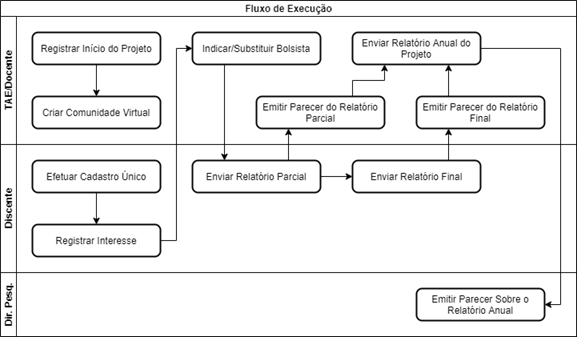
Após aprovação do projeto, inicia a fase de gerenciamento por parte do coordenador do projeto.

[![image.png](https://base.ifpa.edu.br/uploads/images/gallery/2023-06/scaled-1680-/m564Q43saaUQb3oA-image.png)](https://base.ifpa.edu.br/uploads/images/gallery/2023-06/m564Q43saaUQb3oA-image.png)
<span style="mso-no-proof: yes;">  
</span>

#### **<span style="mso-bidi-font-size: 16.0pt; line-height: 107%; mso-bidi-font-weight: bold;"><span style="mso-list: Ignore;"><span style="color: #206ea7;"> </span>3.1.<span style="font-style: normal; font-variant: normal; font-kerning: auto; font-optical-sizing: auto; font-feature-settings: normal; font-variation-settings: normal; font-stretch: normal; font-size: 7pt; line-height: normal; font-family: 'Times New Roman';"> </span></span></span>Registrar Início da Execução do Projeto**

Após aprovação o coordenador do projeto precisa registrar o efetivo início do projeto.

<span style="mso-bidi-font-size: 12.0pt; line-height: 103%; font-family: 'Calibri',sans-serif; mso-fareast-font-family: Calibri;"><span style="mso-list: Ignore;">•<span style="font: 7.0pt 'Times New Roman';"> </span></span></span>**TAE**: Módulo "Pesquisa", Aba "Operações", Item "Projetos de Pesquisa &gt; Listar projetos que participo", Opção "Executar Projeto"

<span style="mso-bidi-font-size: 12.0pt; line-height: 103%; font-family: 'Calibri',sans-serif; mso-fareast-font-family: Calibri;"><span style="mso-list: Ignore;">•<span style="font: 7.0pt 'Times New Roman';"> </span></span></span>**Docente**: Módulo "Portal do Docente", Menu "Pesquisa", Item "Projetos de Pesquisa &gt; Listar Meus Projetos", Opção "Executar Projeto"

#### **<span style="mso-bidi-font-size: 16.0pt; line-height: 107%; mso-bidi-font-weight: bold;"><span style="mso-list: Ignore;"><span style="color: #206ea7;"> </span>3.2.<span style="font-style: normal; font-variant: normal; font-kerning: auto; font-optical-sizing: auto; font-feature-settings: normal; font-variation-settings: normal; font-stretch: normal; font-size: 7pt; line-height: normal; font-family: 'Times New Roman';"> </span></span></span>Criar a Comunidade Virtual do Projeto**

Após início do projeto o coordenador do projeto pode criar uma comunidade virtual com os membros. Esta ficará disponível no módulo "Ambientes Virtuais".

<span style="mso-bidi-font-size: 12.0pt; line-height: 103%; font-family: 'Calibri',sans-serif; mso-fareast-font-family: Calibri;"><span style="mso-list: Ignore;">•<span style="font: 7.0pt 'Times New Roman';"> </span></span></span>**TAE**: Módulo "Pesquisa", Aba "Operações", Item "Projetos de Pesquisa &gt; Listar projetos que participo", Opção "Criar Comunidade Virtual com participantes do projeto"

<span style="mso-bidi-font-size: 12.0pt; line-height: 103%; font-family: 'Calibri',sans-serif; mso-fareast-font-family: Calibri;"><span style="mso-list: Ignore;">•<span style="font: 7.0pt 'Times New Roman';"> </span></span></span>**Docente**: Módulo "Portal do Docente", Menu "Pesquisa", Item "Projetos de Pesquisa &gt; Listar Meus Projetos", Opção "Criar Comunidade Virtual com participantes do projeto"

#### **<span style="mso-bidi-font-size: 16.0pt; line-height: 107%; mso-bidi-font-weight: bold;"><span style="mso-list: Ignore;"><span style="color: #206ea7;"> </span>3.3.<span style="font-style: normal; font-variant: normal; font-kerning: auto; font-optical-sizing: auto; font-feature-settings: normal; font-variation-settings: normal; font-stretch: normal; font-size: 7pt; line-height: normal; font-family: 'Times New Roman';"> </span></span></span>Discente Registra Interesse em um Plano de Trabalho (com Cota de Bolsa)**

No caso de editais que utilizam recursos da Assistência Estudantil, após o projeto ser contemplado com cota de bolsas, os discentes poderão registrar interesse em um determinado plano de trabalho.

<span style="mso-bidi-font-size: 12.0pt; line-height: 103%; font-family: 'Calibri',sans-serif; mso-fareast-font-family: Calibri;"><span style="mso-list: Ignore;">•<span style="font: 7.0pt 'Times New Roman';"> </span></span></span>**Discente**: Módulo "Portal do Discente", Menu "Auxílio", Item "Oportunidades de Bolsa"

<span style="mso-bidi-font-size: 12.0pt; line-height: 100%; font-family: 'Calibri',sans-serif; mso-fareast-font-family: Calibri;"><span style="mso-list: Ignore;">•<span style="font: 7.0pt 'Times New Roman';"> </span></span></span>**<span style="color: #c9211e;">OBS.1</span>**<span style="color: #c9211e;">: Caso o discente tenha aderido ao Cadastro Único do ano/período atual, ele poderá efetuar o registro de interesse.</span>

<span style="mso-bidi-font-size: 12.0pt; line-height: 100%; font-family: 'Calibri',sans-serif; mso-fareast-font-family: Calibri;"><span style="mso-list: Ignore;">•<span style="font: 7.0pt 'Times New Roman';"> </span></span></span>**<span style="color: #c9211e;">OBS.2</span>**<span style="color: #c9211e;">: **Caso o discente não tenha aderido ao Cadastro Único do ano/período atual, ele será encaminhado para o**</span>

<span style="color: #c9211e;"> **formulário do Cadastro Único** e será necessário efetuar o preenchimento do formulário socioeconômico da mesma</span>

<span style="color: #c9211e;"> maneira como é realizada durante a solicitação de outros auxílios estudantis. **Após conclusão do cadastro único, será**</span>

<span style="color: #c9211e;"> **necessário acessar a funcionalidade novamente**, desta vez será possível registrar o interesse em algum plano de trabalho</span>

<span style="color: #c9211e;"> específico, pois o cadastro único já foi realizado.</span>

#### **<span style="mso-bidi-font-size: 16.0pt; line-height: 107%; mso-bidi-font-weight: bold;"><span style="mso-list: Ignore;"><span style="color: #206ea7;"> </span>3.4.<span style="font-style: normal; font-variant: normal; font-kerning: auto; font-optical-sizing: auto; font-feature-settings: normal; font-variation-settings: normal; font-stretch: normal; font-size: 7pt; line-height: normal; font-family: 'Times New Roman';"> </span></span></span>Coordenador do Projeto Indica/Substitui Bolsista**

Para cada plano de trabalho o coordenador do projeto poderá indicar ou substituir bolsistas.

<span style="mso-bidi-font-size: 12.0pt; line-height: 103%; font-family: 'Calibri',sans-serif; mso-fareast-font-family: Calibri;"><span style="mso-list: Ignore;">•<span style="font: 7.0pt 'Times New Roman';"> </span></span></span>**TAE**: Módulo "Pesquisa", Aba "Operações", Item "Planos de Trabalho &gt; Indicar/Substituir Bolsista"

<span style="mso-bidi-font-size: 12.0pt; line-height: 103%; font-family: 'Calibri',sans-serif; mso-fareast-font-family: Calibri;"><span style="mso-list: Ignore;">•<span style="font: 7.0pt 'Times New Roman';"> </span></span></span>**Docente**: Módulo "Portal do Docente", Menu "Pesquisa", Item "Planos de Trabalho &gt; Indicar/Substituir Bolsista", Opção "Indicar Bolsista"

<span style="mso-bidi-font-size: 12.0pt; line-height: 100%; font-family: 'Calibri',sans-serif; mso-fareast-font-family: Calibri;"><span style="mso-list: Ignore;">•<span style="font: 7.0pt 'Times New Roman';"> </span></span></span>**<span style="color: #c9211e;">OBS.</span>**<span style="color: #c9211e;">: No caso de editais que utilizam os recursos da Assistência Estudantil, para os planos de trabalho de bolsistas,</span>

<span style="color: #c9211e;"> somente poderão ser indicados **após os discentes registrarem interesse** através do "Portal do Discente".</span>

#### **<span style="mso-bidi-font-size: 16.0pt; line-height: 107%; mso-bidi-font-weight: bold;"><span style="mso-list: Ignore;"><span style="color: #206ea7;"> </span>3.5.<span style="font-style: normal; font-variant: normal; font-kerning: auto; font-optical-sizing: auto; font-feature-settings: normal; font-variation-settings: normal; font-stretch: normal; font-size: 7pt; line-height: normal; font-family: 'Times New Roman';"> </span></span></span>Discente Envia o Relatório Parcial**

De acordo com o calendário definido pela Diretoria de Pesquisa, o discente deverá submeter 1 (um) relatório parcial durante a execução do projeto.

<span style="font-family: 'Calibri',sans-serif; mso-fareast-font-family: Calibri;">•<span style="mso-tab-count: 1;"> </span></span>**Discente**: Módulo "Portal do Discente", Menu "Pesquisa", Item "Relatórios de Iniciação Científica &gt; Relatórios Parciais &gt; Enviar"

#### **<span style="mso-bidi-font-size: 16.0pt; line-height: 107%; mso-bidi-font-weight: bold;"><span style="mso-list: Ignore;"><span style="color: #206ea7;"> </span>3.6.<span style="font-style: normal; font-variant: normal; font-kerning: auto; font-optical-sizing: auto; font-feature-settings: normal; font-variation-settings: normal; font-stretch: normal; font-size: 7pt; line-height: normal; font-family: 'Times New Roman';"> </span></span></span>Coordenador Emite Parecer sobre o Relatório Parcial**

O relatório parcial de cada discente precisa de um parecer do coordenador do projeto.

<span style="mso-bidi-font-size: 12.0pt; line-height: 103%; font-family: 'Calibri',sans-serif; mso-fareast-font-family: Calibri;"><span style="mso-list: Ignore;">•<span style="font: 7.0pt 'Times New Roman';"> </span></span></span>**TAE**: Módulo "Pesquisa", Aba "Operações", Item "Relatórios de Iniciação Científica &gt; Consultar/Emitir Parecer de Relatórios Parciais"

<span style="mso-bidi-font-size: 12.0pt; line-height: 103%; font-family: 'Calibri',sans-serif; mso-fareast-font-family: Calibri;"><span style="mso-list: Ignore;">•<span style="font: 7.0pt 'Times New Roman';"> </span></span></span>**Docente**: Módulo "Portal do Docente", Menu "Pesquisa", Item "Relatórios de Iniciação Científica &gt; Relatórios Parciais &gt; Consultar/Emitir Parecer"

#### **<span style="mso-bidi-font-size: 16.0pt; line-height: 107%; mso-bidi-font-weight: bold;"><span style="mso-list: Ignore;"> 3.7.<span style="font-style: normal; font-variant: normal; font-kerning: auto; font-optical-sizing: auto; font-feature-settings: normal; font-variation-settings: normal; font-stretch: normal; font-size: 7pt; line-height: normal; font-family: 'Times New Roman';"> </span></span></span>Discente Envia o Relatório Final**

De acordo com o calendário definido pela Diretoria de Pesquisa, o discente deverá submeter 1 (um) relatório final.

<span style="mso-bidi-font-size: 12.0pt; line-height: 103%; font-family: 'Calibri',sans-serif; mso-fareast-font-family: Calibri;"><span style="mso-list: Ignore;">•<span style="font: 7.0pt 'Times New Roman';"> </span></span></span>**Discente**: Módulo "Portal do Discente", Menu "Pesquisa", Item "Relatórios de Iniciação Científica &gt; Relatórios Finais &gt; Enviar"

<span style="mso-bidi-font-size: 12.0pt; line-height: 100%; font-family: 'Calibri',sans-serif; mso-fareast-font-family: Calibri;"><span style="mso-list: Ignore;">•<span style="font: 7.0pt 'Times New Roman';"> </span></span></span>**<span style="color: #c9211e;">OBS.</span>**<span style="color: #c9211e;">: Este somente pode ser enviado a partir de **180 (cento e oitenta) dias após o início da execução** do projeto.</span>

#### **<span style="mso-bidi-font-size: 16.0pt; line-height: 107%; mso-bidi-font-weight: bold;"><span style="mso-list: Ignore;"> 3.8.<span style="font-style: normal; font-variant: normal; font-kerning: auto; font-optical-sizing: auto; font-feature-settings: normal; font-variation-settings: normal; font-stretch: normal; font-size: 7pt; line-height: normal; font-family: 'Times New Roman';"> </span></span></span>Coordenador Emite Parecer sobre o Relatório Final do Discente**

O relatório final de cada discente precisa de um parecer do coordenador do projeto.

<span style="mso-bidi-font-size: 12.0pt; line-height: 103%; font-family: 'Calibri',sans-serif; mso-fareast-font-family: Calibri;"><span style="mso-list: Ignore;">•<span style="font: 7.0pt 'Times New Roman';"> </span></span></span>**TAE**: Módulo "Pesquisa", Aba "Operações", Item "Relatórios de Iniciação Científica &gt; Consultar/Emitir Parecer de Relatórios Finais"

<span style="mso-bidi-font-size: 12.0pt; line-height: 103%; font-family: 'Calibri',sans-serif; mso-fareast-font-family: Calibri;"><span style="mso-list: Ignore;">•<span style="font: 7.0pt 'Times New Roman';"> </span></span></span>**Docente**: Módulo "Portal do Docente", Menu "Pesquisa", Item "Relatórios de Iniciação Científica &gt; Relatórios Finais &gt; Consultar/Emitir Parecer"

#### **<span style="mso-bidi-font-size: 16.0pt; line-height: 107%; mso-bidi-font-weight: bold;"><span style="mso-list: Ignore;"> 3.9.<span style="font-style: normal; font-variant: normal; font-kerning: auto; font-optical-sizing: auto; font-feature-settings: normal; font-variation-settings: normal; font-stretch: normal; font-size: 7pt; line-height: normal; font-family: 'Times New Roman';"> </span></span></span>Enviar Relatório Anual do Projeto**

O coordenador do projeto necessita enviar o relatório anual do projeto.

<span style="mso-bidi-font-size: 12.0pt; line-height: 103%; font-family: 'Calibri',sans-serif; mso-fareast-font-family: Calibri;"><span style="mso-list: Ignore;">•<span style="font: 7.0pt 'Times New Roman';"> </span></span></span>**TAE**: Módulo "Pesquisa", Aba "Operações", Item "Relatórios Anuais de Projeto &gt; Submeter"

<span style="mso-bidi-font-size: 12.0pt; line-height: 103%; font-family: 'Calibri',sans-serif; mso-fareast-font-family: Calibri;"><span style="mso-list: Ignore;">•<span style="font: 7.0pt 'Times New Roman';"> </span></span></span>**Docente**: Módulo "Portal do Docente", Menu "Pesquisa", Item "Relatórios Anuais de Projeto &gt; Submeter"